

- This event has passed.
3 PM – Scratch Level 1
April 17, 2021 @ 3:00 pm - 4:00 pm
- Today we:
- reviewed last week’s homework
- learned how to upload backdrops to Scratch
- Homework:
- get another picture of your mother (so you have two pictures of your mother in total)
- Steps:
- create a new sprite (any sprite is fine)
- click on the “Costumes” tab
- hover above the bottom left button that says “Choose a Costume”, and click on “Camera”
- image attached for explanation
- zoom into the image to see clearer
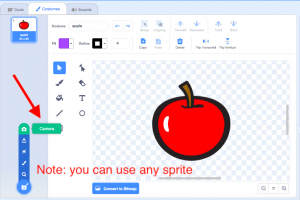
- make sure you allow Scratch to have access to your camera
- there may be a pop-up window asking to “Access” or “Deny” permission. If this happens, click “Allow”
- when your mother is ready to take the photo, click on “Take Photo”
- click on “Save”
- make sure you have two pictures of your mother in total
- if you are having issues with taking pictures, ask your parents for help
- if you need help, email gamas@ayclogic.com or allison.682.lee@gmail.com